Sunday, January 5, 2020

NetApp Storage Encryption (NSE, NAE and NVE)


Configuring NetApp hardware-based encryption
NetApp hardware-based encryption supports full-disk encryption (FDE) of data as it is written. The data cannot be read without an encryption key stored on the firmware. The encryption key, in turn, is accessible only to an authenticated node.
Understanding NetApp hardware-based encryption
A node authenticates itself to a self-encrypting drive using an authentication key retrieved from an external key management server or Onboard Key Manager:
  • The external key management server is a third-party system in your storage environment that serves keys to nodes using the Key Management Interoperability Protocol (KMIP). It is a best practice to configure external key management servers on a different storage system from your data.
  • The Onboard Key Manager is a built-in tool that serves authentication keys to nodes from the same storage system as your data.
You can use NetApp Volume Encryption with hardware-based encryption to “double encrypt” data on self-encrypting drives.
NetApp Storage Encryption (NSE) provides full-disk encryption without compromising storage efficiency or performance
NetApp® Storage Encryption (NSE) is NetApp’s implementation of full-disk encryption (FDE) using self-encrypting drives from leading vendors.
NSE is a nondisruptive encryption implementation that provides comprehensive, cost-effective, hardware-based security that is simple to use. This single-source solution can increase overall compliance with industry and government regulations without compromising storage efficiency.
NSE:
  • Supports the entire suite of storage efficiency technologies from NetApp, including deduplication, compression, and array-based AV scanning
  • Supports the Gemalto SafeNet KeySecure encryption-key appliance, strengthening and simplifying long-term key management.
  • Helps you comply with FISMA, HIPAA, PCI, Basel II, SB 1386, and E.U. Data Protection Directive 95/46/EC regulations using FIPS 140-2 validated hardware
  • Complies with the OASIS KMIP standard, offering compatibility with other key managers and encryption devices
Configuring NetApp Volume Encryption
NetApp Volume Encryption (NVE) is a software-based technology for encrypting data at rest one volume at a time. An encryption key accessible only to the storage system ensures that volume data cannot be read if the underlying device is repurposed, returned, misplaced, or stolen.
Understanding NVE
Both data, including Snapshot copies, and metadata are encrypted. Access to the data is given by a unique XTS-AES-256 key, one per volume. An external key management server or Onboard Key Manager serves keys to nodes:
  • The external key management server is a third-party system in your storage environment that serves keys to nodes using the Key Management Interoperability Protocol (KMIP). It is a best practice to configure external key management servers on a different storage system from your data.
  • The Onboard Key Manager is a built-in tool that serves keys to nodes from the same storage system as your data.
Starting with ONTAP 9.7, aggregate and volume encryption is enabled by default if you have a volume encryption (VE) licence and use an onboard or external key manager. Whenever an external or onboard key manager is configured there is a change in how data at rest encryption is configured for brand new aggregates and brand new volumes. Brand new aggregates will have NetApp Aggregate Encryption (NAE) enabled by default. Brand new volumes that are not part of an NAE aggregate will have NetApp Volume Encryption (NVE) enabled by default.

NetApp Aggregate-level encryption (NAE)

Ordinarily, every encrypted volume is assigned a unique key. When the volume is deleted, the key is deleted with it.
Starting with ONTAP 9.6, you can use NetApp Aggregate Encryption (NAE) to assign keys to the containing aggregate for the volumes to be encrypted. When an encrypted volume is deleted, the keys for the aggregate are preserved. The keys are deleted only after the last encrypted volume in the aggregate is deleted.
You must use aggregate-level encryption if you plan to perform inline or background aggregate-level deduplication. Aggregate-level deduplication is otherwise not supported by NVE.
Starting with ONTAP 9.7, aggregate and volume encryption is enabled by default if you have a volume encryption (VE) licence and use an onboard or external key manager.
NVE and NAE volumes can coexist on the same aggregate. Volumes encrypted under aggregate-level encryption are NAE volumes by default. You can override the default when you encrypt the volume.
You can use the volume move command to convert an NVE volume to an NAE volume, and vice versa. You can replicate an NAE volume to an NVE volume.

Configuring onboard key management

You can use the Onboard Key Manager to authenticate cluster nodes to a FIPS drive or SED. The Onboard Key Manager is a built-in tool that serves authentication keys to nodes from the same storage system as your data. The Onboard Key Manager is FIPS-140-2 level 1 compliant.
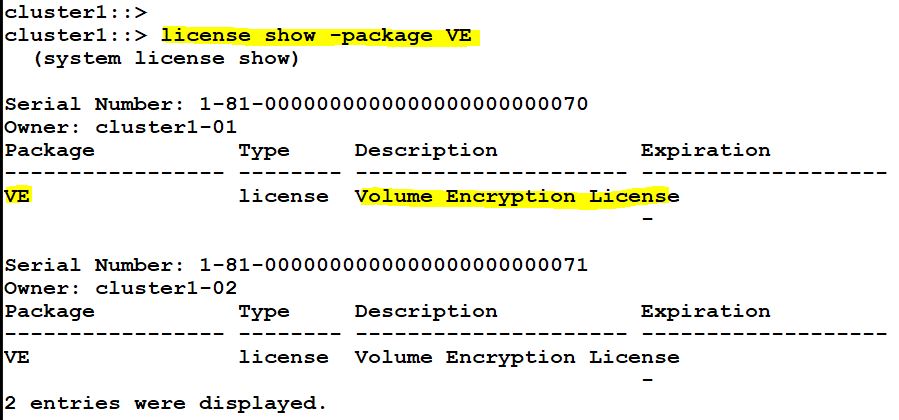
First check the license package VE is installed or not.


Initially there is no key managers installed.


Create key manager either On-Board or External.


Provide the pass phrase and create a onboard key manager. 

Check the key store and backup key information.


Both the nodes using the Onboard key manager for NetApp Storage Encryption.


Now create a volume with option -encrypt true.


Check the encryption status of that volume using the following command.


Create an aggregate with option encrypt-with-aggr-key true, to create NetApp Aggregate Encryption(NAE).


Check the NAE status.


You can disable the aggregate level encryption by using the following command.


Now move the volume to this non-encrypt aggregate with option encrypt-destination false.

The you can use it vice-versa for enabling the volume encryption with true option.


Now the volume is disabled for encryption.


Compliant WORM Storage Using NetApp SnapLock


SNAPLOCK:

Many businesses rely on some use of write once, read many (WORM) data storage to meet regulatory compliance or simply to add another layer of data protection to their critical files (or data).

To address issues faced by growing business requirements for WORM data storage and to alleviate issues inherent with traditional WORM storage solutions, NetApp introduced SnapLock software. SnapLock allows companies to benefit from the data permanence functionality of traditional WORM storage using existing easy-to-manage NetApp disk storage technologies.

SnapLock is the NetApp high-performance compliance solution that provides the capability of data retention and WORM protection for retained data. With SnapLock, customers can create nonmodifiable, nonerasable volumes to prevent files from being altered or deleted until a specified retention date. SnapLock allows this retention to be performed at the file level through standard open file protocols such as CIFS and NFS. SnapLock is a license-based feature of ONTAP that works with application software to administer nonrewritable storage of data.

There are two types of SnapLock:
·        SnapLock Compliance (SLC)
·        SnapLock Enterprise (SLE)

In a data compliance environment, you cannot rely on a system clock because it can be arbitrarily modified by the administrator, thereby compromising the retention period of WORM files and Snapshot™ copies. Therefore, SnapLock relies on the ComplianceClock service in ONTAP, which is a softwarebased tamper-resistant clock. The ComplianceClock can be initialized only once by the administrator on every node, after which it operates based on hardware ticks.

There are two types of ComplianceClock:

·        Volume ComplianceClock (VCC)
·        System ComplianceClock (SCC)


Each SnapLock volume maintains the following on-disk metadata for the VCC:
·        VCC time: 64-bit VCC time stamp
·        SCC time: 64-bit SCC time stamp (SCC time at last update)
·        Node ID: unique identifier for the node (used for SCC-VCC association)
·        SCC ID: unique identifier for the SCC (used for SCC-VCC association)

SnapLock is the aggregate-level property. In order to set up WORM storage, the administrator can specify the -snaplock-type while creating the aggregate.
SnapLock provides retention granularity at the individual file level. There are two methods to commit a file to WORM on a SnapLock volume.

·        Manual Commit
·        Autocommit

Regardless of how files are committed to an immutable state on a SnapLock volume, it is important to understand the retention period settings. Every record committed to the WORM state on a SnapLock volume can have an individual retention period associated with it. ONTAP enforces retention of these records until the retention period ends. After the retention period is over, the records can be deleted but not modified. Each SnapLock volume has options that are set to control the minimum, maximum, and default retention periods. These values are minimum-retention-period, maximum-retention-period, and default-retentionperiod, respectively.

SnapLock Volume Append Mode (VAM)
When a user commits a file in a SnapLock volume to WORM, the file cannot be deleted until the file retention time has expired. At no point in time can the file contents be modified before or even after expiration. A file's retention time can only be extended, not shortened. For logging purposes, a user might want to append to this WORM file.

Legal Hold
ONTAP 9.3 introduces a feature of legal hold. Legal hold is a feature by which files, folders, a volume, or list of volumes can be held in a tamper-proof state for an indefinite time period for litigation purposes. This hold prevents deletion of the specified objects until the legal hold is removed. This legal hold can be released at any time. If a previous hold of any sort or the original retention period has not expired when the legal hold is removed, the original retention period or previous hold remains in effect. A legal hold is allowed only on SnapLock Compliance volumes. Up to 255 legal holds per file and 65,535 litigations per volume can be applied.


Check the NetApp snaplock license.


Initialize the compliance clock for all the nodes.


Then create an aggregate with the option -snaplock-type.


Check the aggregate snaplock type.


Create volume in the compliance enabled aggregate.


List the volume snaplock information.


Once the volume is exported or shared via NFS or CIFS, then create a files and change the file access permission to read only.

Then using the following commands to check the file type and file type is changed to WORM.


You want to set auto-commit for files, then use the following command to modify and set the time period for auto commit for files in the compliance volumes.


Tuesday, December 31, 2019

ONTAP 9.7 Fabric Pool Mirroring


Fabric Pool Overview

FabricPool, first available in ONTAP 9.2, is a NetApp Data Fabric technology that enables automated tiering of data to low-cost object storage tiers either on or off premises. Unlike manual tiering solutions, FabricPool reduces total cost of ownership by automating the tiering of data to lower the cost of storage. It delivers the benefits of cloud economics by tiering to public clouds such as Alibaba Cloud Object Storage Service, Amazon S3, Google Cloud Storage, IBM Cloud Object Storage, and Microsoft Azure Blob Storage as well as to private clouds such as NetApp StorageGRID®. FabricPool is transparent to applications and allows enterprises to take advantage of cloud economics without sacrificing performance or having to rearchitect solutions to leverage storage efficiency.

• ONTAP supports FabricPool on AFF systems and all-SSD aggregates on FAS systems.


• ONTAP Select supports FabricPool. NetApp recommends using all-SSD FabricPool aggregates.


NetApp brings in an innovation in Flash storage systems, the Fabric Pool aggregates. With FabricPool aggregates, you can move your cold data to external, less expensive storage solutions available today.

FabricPool is an all SSD aggregate that has an external capacity tier attached to it. Data that is written to the SSD aggregates is called as Performance tier and backup and/or snapshots that is moved to Amazon S3 or Netapp StorageGrid Webscale is called as Capacity Tier. 

FabricPool will be designed as an innovative technology that allows any workload (SAN or NAS) on an ONTAP system to keep hot data on all-Flash but tier inactive cold data off onto low-cost object storage, either on-premises or in the Cloud. This inactive data is often up to 80% of the overall storage footprint, leading to significant savings. 


You can attach capacity tiers to SSD aggregates and set tiering policies on the SSD volumes. Currently supported tiering policies are:

·         Snapshot-only which is the default
·  Backup – Data is tired to the capacity tier as snapmiror/snapvault destinations

·         None

Managing FabricPool mirrors
To ensure data is accessible in data stores in the event of a disaster, and to enable you to replace a data store, you can configure a FabricPool mirror by adding a second data store to synchronously tier data to two data stores. You can add a second data store to new or existing FabricPool configurations, monitor the mirror status, display FabricPool mirror details, promote a mirror, and remove a mirror. You must be running ONTAP 9.7 or later.

Creating a FabricPool mirror

To create a FabricPool mirror, you attach two object stores to a single FabricPool. You can create a FabricPool mirror either by attaching a second object store to an existing, single object store FabricPool configuration, or you can create a new, single object store FabricPool configuration and then attach a second object store to it. You can also create FabricPool mirrors on MetroCluster configurations.

Fabric Pool Mirroring:


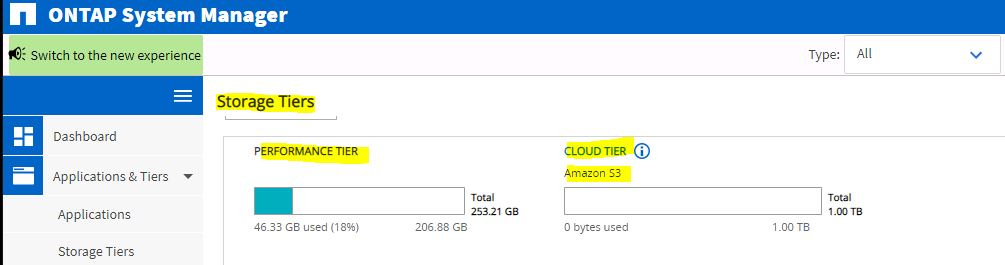
To implement a fabric pool mirror, first create a Cloud Tier (Fabric Pool) with two object stores and attach aggregates.


Specify the amazon account with your access key information, then provide the s3 bucket name which you had created in amazon s3.


Once the authentication is successful, then the cloud tier will create.

Object store created successfully.


Using CLI, you can list the object store configuration and the aggregates which are attached to it.

In this example, we have one object store (aws_s3) and two aggregates (aggr1 & Aggr2) attached to it.

Both the mirror type is primary.


Add one more object store (aws_s3_DR).


Now I have two object stores (aws_s3 & aws_s3_DR).


Then you can create a fabric pool mirror using object store mirror command.


Now you can see aws_s3 is primary and aws_s3_DR is mirror.


You can promote the mirror to primary also using the following command.


Now aws_s3_DR is primary and aws_s3 is Mirror.


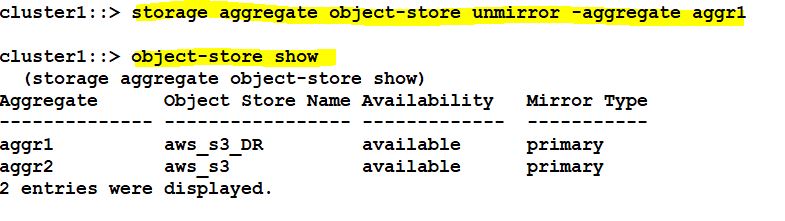
If you don’t want mirror, then you can unmirror this using the following command.

Now it is unmirrored and both are primary.


Sunday, December 22, 2019

NetApp Trident with Kubernetes


What is Trident?

Trident is a fully supported open source project maintained by NetApp. It has been designed from the ground up to help you meet the sophisticated persistence demands of your containerized applications.
Through its support for popular container platforms like Kubernetes and Docker, Trident understands the natural and evolving languages of those platforms, and translates requirements expressed or implied through them into an automated and orchestrated response from the infrastructure.
Today, that includes our ONTAP (AFF/FAS/Select/Cloud), Element (HCI/SolidFire), and SANtricity (E/EF-Series) data management software, plus the Azure NetApp Files service in Azure, the Cloud Volumes Service for AWS in Amazon Web Services, and the Cloud Volumes Service for GCP in Google Cloud. That list continues to grow.
Persistent Storage Concepts and Trident Configuration This section of the lab explains how Trident integrates with Kubernetes. It also explores the Kubernetes and Trident elements that a storage administrator will have to configure to enable DevOps users to provision storage with Trident. Kubernetes and Trident operation relies on several constructs that DevOps engineers and storage administrators need to be familiar with.

• Pod: A pod describes a unit of deployment for an application or application service (i.e., microservice). A pod consists of one or more containers that are expected to be executed together.

• Deployment: A pod with additional metadata and features, such as the number of replicas that should be running at any time. In other words, a deployment is one of the ways to describe an application to Kubernetes. For example, a deployment with one replica specified means that Kubernetes will ensure that one instance of the pod is always running somewhere in the cluster.

• Storage Class: Provides an abstract definition of storage. Each storage class has a provisioner and some number of defined parameters. For NetApp, the provisioner is Trident, an open source project which manages the creation and destruction of volumes for ONTAP, SolidFire, E-Series storage arrays, Cloud Volume Service in AWS, and Azure NetApp Files.

• Persistent Volume (PV): A storage device that a container uses to store persistent data. It is decoupled from the pod and has a lifecycle of its own.

• Persistent Volume Claim (PVC): A user/application creates a PVC to request access to persistent storage. The PVC describes requirements like the size and type of the required volume (e.g., “I need 20 GiB of storage”), which Kubernetes evaluates against its inventory of available PVs, and assigns one that meets those needs. The application can then utilize the PVC to ensure that Kubernetes mounts the assigned PV to the host that is executing the pod. If the PVC specifies a storage class, then Kubernetes follows the same process to find a match in the existing pool of PVs. However, if it cannot find a matching PV, Kubernetes will rely on the provisioner specified in the storage class to create a suitable match.

• Namespace: A namespace is an administrative division of resources in the cluster that provides isolation between users, their pods/deployments, and resource assignments.


To list the Nodes and Namespaces.


List the NetApp Trident version.


Listing the crds.


List the deployment information.


List the storage backends. Ex. ONTAp and Solidfire storages are connected as backends.


Listing the storage classes.


Storage Class in details:


Login to ONTAP Cluster and list the flexvolume that already created.


Now run the yaml or json script for claiming storage space for the container using NAS.


After executing, the volume is created successfully.


Check the backend UUID:


Snapshot creation for Data Protection: