
What is Virtual Volumes (vVols)?
Eliminate physical containers and enable more flexible
consumption of resources with Virtual Volumes (vVols). This integration and
management framework for external storage provides finer control at the VM-level,
streamlines storage operations, and offers flexibility of choice.
vVols are VMDK granular storage entities exported by storage arrays. vVols are exported to the ESXi host through a small set of protocol end-points (PE). Protocol Endpoints are part of the physical storage fabric, and they establish a data path from virtual machines to their respective vVols on demand. Storage systems enable data services on vVols. The results of these data services are newer vVols. Data services, configuration and management of virtual volume systems is exclusively done out-of-band with respect to the data path. vVols can be grouped into logical entities called storage containers (SC) for management purposes. The existence of storage containers is limited to the out-of-band management channel.
vVols and Storage Containers (SC) form the virtual storage fabric. Protocol Endpoints (PE) are part of the physical storage fabric.
By using a special set of APIs called vSphere APIs for Storage Awareness (VASA), the storage system becomes aware of the vVols and their associations with the relevant virtual machines.
Characteristics of vVols:
·
No
File System.
·
ESX
manages the array through VASA (vSphere APIs for Storage Awareness) APIs.
·
Arrays
are logically partitioned into containers, called Storage Containers.
·
Virtual
machine disks, called vVols, stored natively on the Storage Containers.
·
IO
from ESXi host to the storage array is addressed through an access point
called, Protocol Endpoint (PE).
·
Data
Services are offloaded to the array. Snapshot, Replication, Encryption.
·
Managed
through storage policy-based management (SPBM) framework.
VASA (vSphere APIs for Storage
Awareness) APIs (VP)
A vVols storage provider, also called a
VASA provider is a software component that acts as a storage awareness service
for vSphere. The provider mediates out-of-band communication between the
vCenter Server and ESXi hosts on one side and a storage system on the other.
·
Software
component developed by Storage Array Vendors.
·
ESX
and vCenter Server connect to VASA Provider.
·
Provides
Storage awareness services.
·
Single
VASA Provider can manages multiple arrays.
·
Supports
VASA APIs exported by the ESXi host.
·
VASA
Provider can be implemented within the array’s management server or firmware.
·
Responsible
for creating vVols.
Storage Containers (SC)
Unlike traditional LUN and NFS based
vSphere storage, the vVols functionality does not require pre-configured
volumes on a storage side. Instead, vVols uses a storage container, which is a
pool of raw storage capacity or an aggregation of storage capabilities that a
storage system can provide to vVols.
·
Logical
storage constructs for grouping of vVols.
·
Logically
partition or isolate virtual machines with diverse storage needs and
requirement.
·
A
single Storage Container can be simultaneously accessed via multiple Protocol
Endpoints.
·
Desired
capabilities are applied to the Storage Containers.
·
VASA
Provider discovers Storage Container and reports to the vCenter Server.
·
Any
new virtual machines that are created are subsequently provisioned in the
Storage Container.
Protocol Endpoint (PE)
Although storage systems manage all
aspects of vVols, ESXi hosts have no direct access to vVols on the storage
side. Instead, ESXi hosts use a logical I/O proxy, called the Protocol Endpoint
(PE), to communicate with vVols and virtual disk files that vVols encapsulate.
ESXi uses Protocol Endpoints (PE) to establish a data path on demand from
virtual machines to their respective vVols.
·
Separate
the access points from the storage itself.
·
Can
have fewer access points.
·
Existing
multi-path policies and NFS topology requirements can be applied to the PE.
·
Access
points that enables communication between ESXi hosts and storage array systems.
·
Compatible
with all SAN and NAS Protocols: iSCSI, NFS v3, FC, FCoE.
·
A
Protocol Endpoint can support any one of these protocols at a given time.
vVols Objects
A virtual datastore represents a
storage container in vCenter Server and the vSphere Web Client. vVols are encapsulations
of virtual machine files, virtual disks, and their derivatives.
·
Virtual
machine objects stored natively on the array storage containers
·
There
are five different types of recognized vVols:
1.
Config-vVol
- Metadata
2.
Data-vVol
- VMDKs
3.
Mem-vVol
- Snapshots
4.
Swap-vVol
- Swap files
5.
Other-vVol
- Vendor solution specific
VSC (Virtual Storage Console)
The virtual appliance for Virtual Storage Console (VSC), VASA Provider, and Storage Replication Adapter (SRA) provides end-to-end life cycle management for virtual machines in VMware environments that use NetApp storage systems. It simplifies storage and data management for VMware environments by enabling administrators to directly manage storage within the vCenter Server.
The 9.6 release of the virtual appliance for Virtual Storage Console (VSC), VASA Provider, and Storage Replication Adapter (SRA) provides the combined features of VSC, VASA Provider, and SRA in a single deployment.
Support for ONTAP 9.6:
The 9.6 release of the virtual appliance for Virtual Storage Console (VSC), VASA Provider, and Storage Replication Adapter (SRA) supports ONTAP 9.6.
Availability of VVol reports:
Starting with the 9.6 release of the virtual appliance for VSC, VASA Provider, and SRA, you can view and export VVol datastore reports. The VVol reports enable you to review and identify potential issues with the VVol datastores and virtual machines in your vCenter Server. The following VVol reports are available:
• VVol Datastore Report
• VVol Virtual Machine Report
Login to vSphere web client 6.7.
Open Virtual Storage Console.

You can see the VSC dash board, from there you can add the storage system and Provision the Datastore.

List the available connected storage systems.
Here you can see the 2 ontap 9.6 clusters.


Create a New datastore using the following information.
Provisioning Destination Storage System
Type of Datastore
Name of the datastore
Protocol

Now select the Storage Capability Profiles.

Create a new Flex volumes with your required size.

Here I have created 2 Flexvols with 10GB size.


New iscsi vVol datastore created successfully.

Same as you can create a vVol using NFS protol also.


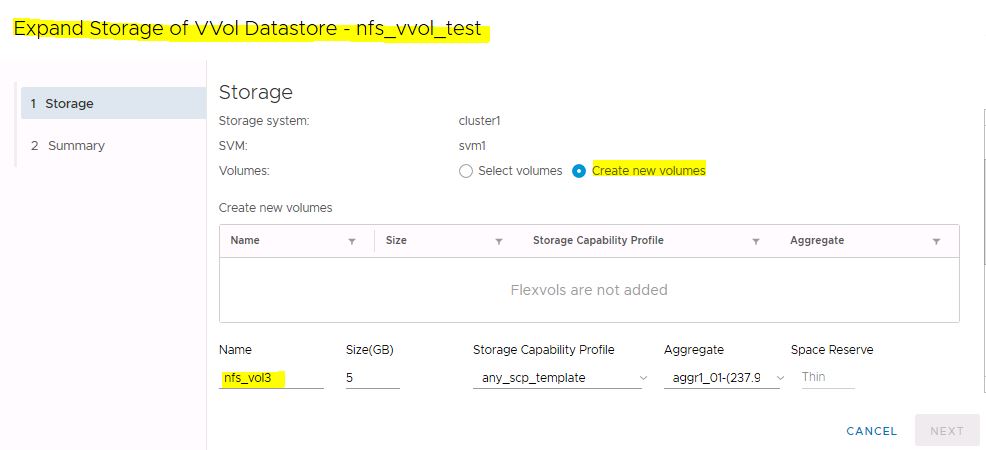
You can expand the datastore also.


Starting with the 9.6 release of the virtual appliance for VSC, VASA Provider, and SRA, you can view and export VVol datastore reports. The VVol reports enable you to review and identify potential issues with the VVol datastores and virtual machines in your vCenter Server.
The following VVol reports are available:
• VVol Datastore Report
• VVol Virtual Machine Report

You can create a Policies and Profiles also.

Create a new VM storage Policy.

Select the vCenter server and Policy Name.

Now select the Policy Rules.


Now select the compatible storage vVol objects.


You can edit and set this new VM storage policy as a default one for any vVol datastore.


Now select the vVol data store

VM is created and powered on successfully.

Now login to the new VM.

New vVol reports section.

Take a snapshot of the VM.


Check the storage efficiency from ONTAP system Manager.
All De-Duplication and Efficiency for the vVol datastore.

Take one moew snapshot and see the difference in duplication.


