Friday, April 14, 2017

ONTAP 9.1 SVM ROOT VOLUME PROTECTION


SVM ROOT VOLUME PROTECTION:


To protect the Storage Virtual Machine (SVM) namespace root volume, you can create a load-sharing mirror volume on every node in the cluster, including the node in which the root volume is located. Then you create a mirror relationship to each load-sharing mirror volume
and initialize the set of load-sharing mirror volumes.

Creating load-sharing mirror volumes

For protecting the root volume of a Storage Virtual Machine (SVM), you must create a FlexVol volume on every node of the cluster and designate it as a load-sharing mirror destination.


Creating load-sharing mirror relationships

You must create a load-sharing mirror relationship between the root volume of the Storage Virtual Machine (SVM) and each of the load-sharing mirrors created for the SVM root volume protection.

Create LS mirror relationship first.


Then initialize  the load share mirror set.


Now it is transferred and snapmirrored.


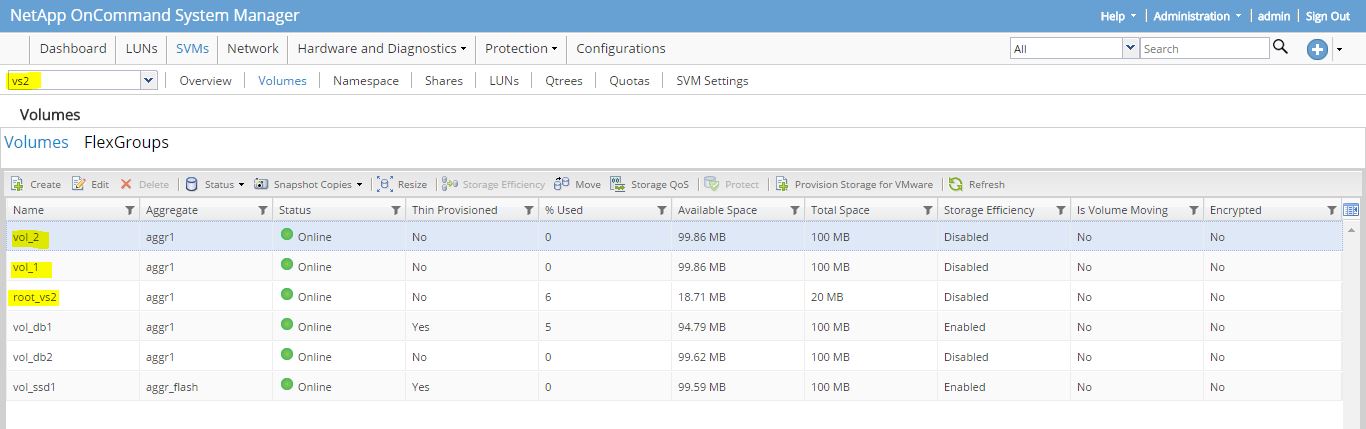
Check field type of volumes.


Restoring the SVM root volume by promoting a load-sharing mirror

If the Storage Virtual Machine (SVM) root volume becomes unavailable, read access is provided through the load-sharing mirror volumes. To enable write access to the SVM root volume, you must promote one of the load-sharing mirror volumes and rename it with the original SVM root volume name.

For restore, promote any other volume act as a SVM root volume.


Now check the volume type.


Thursday, April 13, 2017

ONTAP 9.1 Volume Efficiency Features


De-duplication, data compression, and data compaction:


Ontap 9.1, using deduplication, data compression, and data compaction feature to increase storage efficiency of your storage systems.
You can run deduplication and data compression together or independently on a FlexVol volume or an Infinite Volume to achieve optimal space savings. Deduplication eliminates the duplicate data blocks and data compression compresses the data blocks to reduce the amount of physical storage required.

Data Compaction:

Inline data compaction stores multiple user data blocks and files within a single 4 KB block on a system running ONTAP. Inline data compaction is enabled by default on All Flash FAS (AFF) systems, and can be optionally enabled on volumes on FAS systems.
The volume space guarantee must be set to none.
Without data compaction, ONTAP stores each file in one or more 4 KB blocks on solid state drives (SSDs) and hard disk drives (HDDs). Data compaction increases storage efficiency by storing more data in less space.
The data compaction process has CPU overhead, and is best suited for faster controllers. Storage savings can be significant for environments with highly compressible I/O and small files or I/O.

If enabled, data to be written goes through inline zero deduplication, then inline compression, and then inline deduplication. Data compaction takes place after compression and deduplication, and is independent of these operations.

For example, assume files of the following sizes have been compressed and are ready to write to SSD:


 Without data compaction, each file would get its own 4 KB block, consuming 36 KB:


With data compaction, multiple files are written to each 4 KB block, consuming only 12 KB:


To enable the Compaction for FAS systems :

To check the compaction status of Aggregates and Volumes.


To enable the compaction of FAS systems.


To enable the volume efficiency of volume vol_db1.


To check the inline duplication, compression and compaction.


To enable the compression and inline compression.


Create a Flecvol using only SSD disks.


Enable compression and compaction.


§You can move between secondary compression and adaptive compression depending on the amount of data read.

§Adaptive compression is typically preferred when there are lot of random reads on the system and higher performance is required.


§Secondary compression is preferred when data is written sequentially, and higher compression savings are required.


Undo the compression first.


Now change the compression type.


There are two types of policies,

One is Scheduled and another one is Threshold.
Create a new threshold policy type.


Associate this policy to the volume.


To check space by volume efficiency.


To check the volume efficiency statistics.


Monday, March 13, 2017

NetApp ONTAP 8.3 Aggregate Mirror


Aggregate Mirror:


Mirrored aggregates have two plexes (copies of their data), which use the SyncMirror functionality to duplicate the data to provide redundancy.

When SyncMirror is enabled, all the disks or array LUNs are divided into two pools, and a copy of the plex is created. The plexes are physically separated (each plex has its own RAID groups and its own pool), and the plexes are updated simultaneously. 

This provides added protection against data loss if more disks fail than the RAID level of the aggregate protects against or there is a loss of connectivity, because the unaffected plex continues to serve data while you fix the cause of the failure. After the plex that had a problem is fixed, you can resynchronize the two plexes and reestablish the mirror relationship.

Creating Syncmirror for an existing aggregate.


List the aggregate show command to ensure that aggr got mirrored.


After sync state, it creates two plexes.


To list the plex information.


Now in this example, 4 disks in plex0 and 4 disks in plex2.


Now you can add disks to a mirroed aggregate by using the following command with two options (-disk-list and -mirror-disk-list).


Now you have 12 disks and each plex added by 2 disks.


Sunday, March 12, 2017

NetApp ONTAP 9.1 FlexGroup


FlexGroup volume:

A FlexGroup volume is a scale-out NAS container that leverages the cluster resources to provide performance and scale. FlexGroup volumes provide high performance along with automatic load distribution and scalability.
A FlexGroup volume contains a number of constituents that automatically and transparently share a traffic load.


FlexGroup volumes provide the following benefits:
  • FlexGroup volumes provide high scalability.
    The qualified limits for a FlexGroup volume in ONTAP 9.1 are 20 PB maximum size with 400 billion files on a 10-node cluster.
  • FlexGroup volumes can leverage the resources of an entire cluster to serve high-throughput and low-latency workloads
  • A FlexGroup volume is single name space container that allows simplified management that is similar to FlexVol volumes.


You can either deploy a FlexGroup volume where ONTAP automatically selects the aggregates based on best practices and configures the FlexGroup volume, or create a FlexGroup volume by manually selecting the aggregates and configuring it for data access. 


In System Manager, select SVM - Volumes - Flexgroups - create.

Two options are available.

1. Recommended Best Practices
2. Manually select Aggregates 


Now Creating Flex Group.


Successfully Flexgroup got created.

Now you can create a NAS (NFS/CIFS) share.


List the complete information and Manage the FlexGroups.


NetApp ONTAP 9.1 Netgroup Configuration


You can use netgroups for user authentication and to match clients in export policy rules.

You can provide access to netgroups from external name servers (LDAP or NIS), or you can load netgroups from a uniform resource identifier (URI) into SVMs using the 

vserver services name-service netgroup load command.


Listing the netgroup file information.


Load the netgroup file from FTP server.


Listing the netgroup status.


Listing the netgroup file information.


Create a new policy and rule using netgroup.


Listing the netgroup client information.


Mount from the client side (RHEL).